PST File Splitter
Split Large Outlook PST Files into Multiple Smaller Files
If Outlook PST file has increased more than before, use the Windows Utils PST File Splitter tool to split large Outlook PST to multiple smaller files, without rearranging the mailbox. By file size, date range, or by folder, splitting mailbox archive, then continue with to protecting, import and optimize Windows Outlook.
254 downloads recorded
Digitally Signed
100% Virus-Free
High Speed Processing
Windows 11 & 10 Certified
Choose Your PST File Splitter Edition
Select the edition tailored for your workflow — from personal single-mailbox conversions to advanced legal forensics and enterprise command-line automation.
Standard Edition
Essential for individual users & small conversions
1 PC / Machine • Lifetime License & Free Updates
INCLUDED IN STANDARD:
- Convert single or multiple PST File Splitter files
- Preserve attachments and email metadata directly
- Retain full header formatting and dates
- Maintain original mailbox folder hierarchy
- 100% offline & local processing on your PC
- Compatible with Windows 11, 10, 8, 7 (32/64-bit)
30-Day Money-Back Guarantee • Instant Email Delivery
Professional Edition
Advanced batch conversion & deep drive search
Up to 5 PCs • Lifetime License & Free Updates
EVERYTHING IN STANDARD, PLUS:
- Search PST File Splitter files within Selective or All Drives
- High-Speed multi-threaded batch conversion engine
- Remove SMIME & OpenPGP encryption from emails
- Advanced search filters (Date range, sender, subject)
- Export with custom margins & Bates numbering
- Print emails with complete attached files
30-Day Money-Back Guarantee • Instant Email Delivery
Enterprise / Site Edition
Forensic legal discovery & enterprise IT suite
Unlimited PCs • Lifetime License & Free Updates
EVERYTHING IN PRO, PLUS:
- Export into Searchable & Archival Standard PDF/A format
- Multi-Format Export: PDF, EML, MSG, HTML & DOCX
- AES-256 Bit Encryption, password protection & watermarks
- Convert all mail items into standard MSG & PST files
- Save mailbox metadata into CSV & spreadsheet reports
- Command-Line (CLI) automated execution for enterprise IT
30-Day Money-Back Guarantee • Instant Email Delivery
100% Risk-Free Guarantee
30-day money-back refund policy
Instant Digital Delivery
Receive activation license key immediately
256-Bit SSL Checkout
Verified & encrypted transaction
About PST File Splitter for Windows
WindowsUtils PST Splitter makes it easier for you to split Outlook PST file. If your mail box has hundreds of emails or the PST file has become huge, then split the PST file by date, by year, by folder, by email id or by file size. Select the right option and maintain your mailbox efficiently.
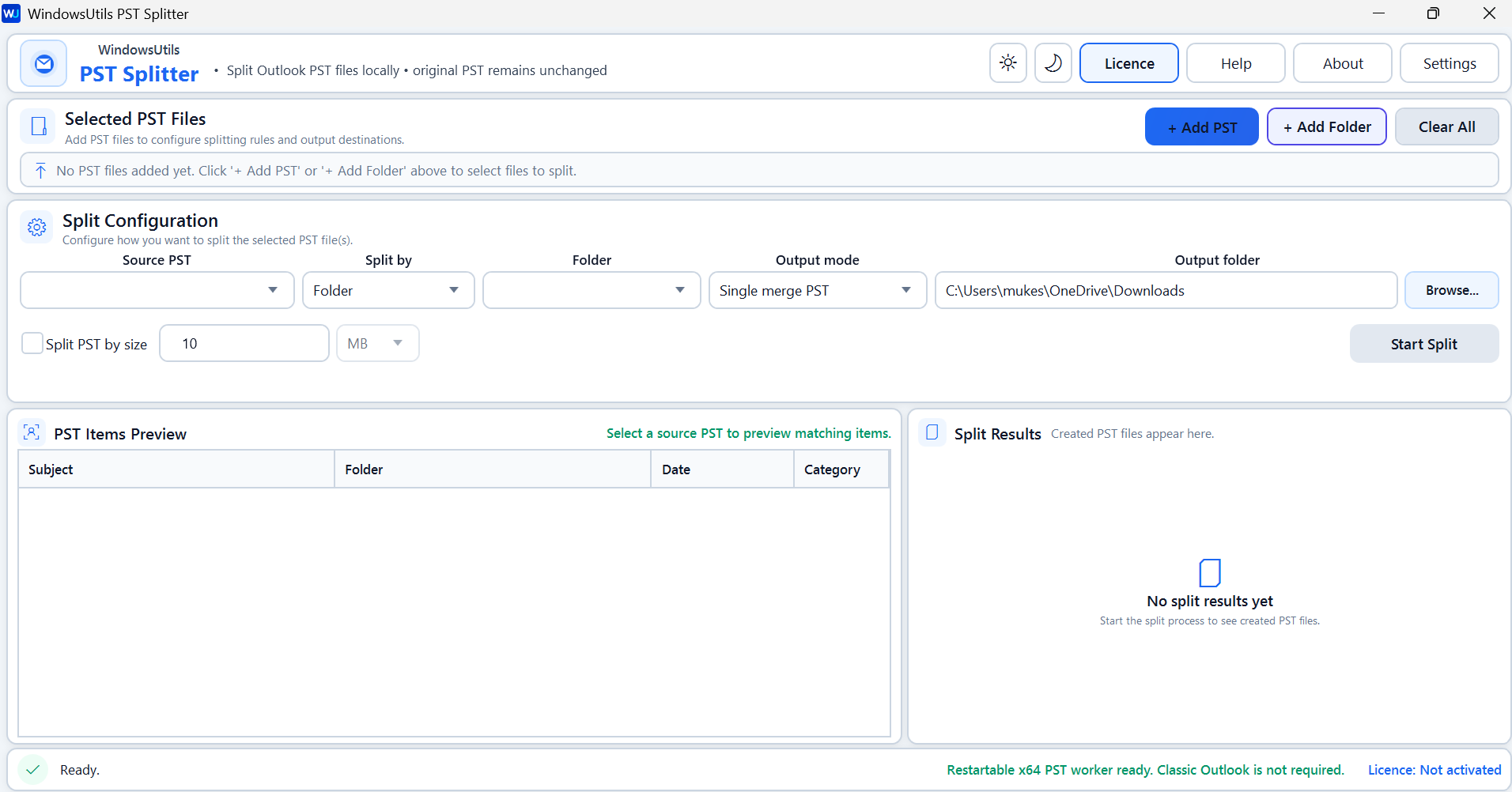
Prior to splitting you may view the preview of email items: – subject, email id, and folder name. You can see the preview of email details in order to verify mailbox data & select the right PST file.
Begin exploring your system and selecting the PST file you are going to divide. Now simply choose the destination folder for saving results, and simply click on Next button to start splitting PST files. Also, your original PST file will be retained as is after the process completes and can be used in future.
Security Architecture
100% Offline Local
OS Compatibility
Windows 11, 10, 8.1, 8, 7 (32-bit & 64-bit)
Data Integrity
100% Lossless
Supported Formats
PST
Related Search Topics & Capabilities:
Engineered For Speed. Built For 100% Accuracy.
Discover why IT specialists and individual users trust PST File Splitter for high-speed, secure, and lossless processing on Windows.
Safe Local PST Processing
Processing of select PST files can be done right on your local machine without changing source files. Processing of PSTs will keep the source mailbox archive intact and let users create and manage output files as per your preferred configuration.
Preview PST Items Before Splitting
Preview indexed mailbox items in a table displaying email subjects, folder locations, dates, and categories. This helps users review available data and understand the contents of the selected PST file before starting the process.
Choose a Custom Output Folder
Select a preferred destination folder for saving the generated PST files. This feature gives users control over output organization and helps them store processed mailbox data in an accessible location on their computer.
Add PST Files from a Folder
Select a folder containing PST files to simplify file selection and preparation. This feature reduces repetitive browsing when working with multiple mailbox archives and helps users prepare their files efficiently.
Divide PST by Date
Split By Email Date On splitting Outlook PST files by date, the user can select the mailbox on full years or only specific dates data. Split Outlook PST files by email date.
Divide PST Files by Year
Make an individual PST file to split Outlook email according to years. This allows you to manage your emails on a yearly basis and keep a repository of your important business and personal mails.
Split PST Files by Folder
Split PST mailbox data by Outlook folders. Use this method if you wish to spread content of the mailbox across multiple existing folders. A nice thing when you want the program to create mailbox folders for you or organise your mailbox.
Split PST Files by Email Address
Sort by Email Address: Sort by email address in your mail account to help you easily to group the mail data belonging to various email owners. You can use this to make the email folder a little less cluttered and also to locate your messages more quickly.
Divide PST Files by Size
Split large PST files in Outlook using size limit Split Outlook PST files into smaller ones. You can use this option to break up large archives of mailbox data, to reduce file size, for easier file saving, to easer transfer of large PST files.
Combine PST Files into a single PST
Merge selected PST mailboxes into one. This feature allows combining mailboxes into a single PST file which enables also a central access to messages from different exchanges.
Create One PST per Email
Generate separate PST output files for individual emails using the available output mode. This option supports specialized email organization requirements and helps users manage selected email data independently.
Add Multiple PST Files
Add PST files to the software for processing through a convenient file-selection interface. This feature simplifies the preparation of mailbox data and allows users to configure splitting operations for their selected source files.
100% Air-Gapped Privacy
Zero cloud telemetry or data transmission. All operations execute directly on your physical hardware.
Certified Lossless Quality
Bit-for-bit accuracy preserving inline attachments, message formatting, headers, and metadata.
Standalone Speed Engine
Independent native executable. No Outlook, Exchange, or Office runtime installation required.
See PST File Splitter in Action
Click any preview thumbnail to inspect the full interface and options.
How It Works: Step-by-Step
Effortless processing in just a few clicks. Runs completely offline on your Windows system.
Include your PST Files
Open Windows Utils PST Splitter and choose PST Files Once the software is installed on your Windows Operating system, go to the open Windows Utils PST Splitter for Windows tool. Here search for the PST Files that need to split.
How to Split PST Files Step-by-Step
Follow full photographic walkthroughs showing drive selection, deep sector scanning (11,000+ MB/s), 2 MB free preview limit, and lossless verified file restoration.
Side-by-Side Comparison
Compare PST File Splitter against manual workarounds and alternative software. Discover why WindowsUtils delivers higher accuracy, zero cloud dependencies, and lifetime cost savings.
System Requirements
- Windows 11, 10, 8.1, 8, 7 (32-bit & 64-bit)
- Compatible with 32-bit and 64-bit Windows systems.
- 1 GHz processor or faster.
- 1 GB minimum, 2 GB or more recommended for smoother performance.
- At least 100 MB of free space for software installation.
- Administrator privileges may be required for installation or certain system operations.
- An accessible Outlook PST file that the software can read.
- Sufficient free disk space to save the split PST files.
- Enough free space to accommodate the generated PST files, especially when working with large mailboxes.
Supported Formats
Frequently Asked Questions
Trusted by Professionals Worldwide
"WindowsUtils PST File Splitter made it easy to divide a large PST file into smaller, manageable files. The process was straightforward, and I was able to organize my Outlook data without any hassle."
Robert Wilson
IT Manager
"I was looking for a reliable way to reduce the size of my Outlook PST file, and WindowsUtils PST File Splitter worked really well. The interface is simple, and the splitting process was quick and convenient."
Emily Parker
Office Administrator
"A very useful tool for managing oversized PST files. WindowsUtils PST File Splitter helped me split my mailbox data into smaller PST files with minimal effort. It is simple enough for everyday users."
James Mitchell
Systems Administrator
"I appreciate having a desktop tool that processes PST files locally without needing to upload mailbox data to an online service. The output folder selection is also useful."
Smith
Manager
Related Guides & Tutorials
Comprehensive step-by-step documentation, migration troubleshooting, and expert recovery tips.
How to Split PST Files Step-by-Step
Complete step-by-step visual tutorial detailing file locations, scanning procedures, and Outlook mounting instructions.

Defeating the 50GB Limit: How to Safely Divide Oversized Outlook PST Files
Prevent severe mailbox corruption and Outlook freezes. Learn how to split massive PST files exceeding 20GB and 50GB into smaller, high-performance archives.
Reclaiming Outlook White Space: How to Shrink and Compact Oversized PST Archives
Deleting emails doesn't shrink your PST file due to internal white space allocation. Discover how Outlook's Compact Now operation works and how to reclaim gigabytes of disk space.
Ready to Get Started with PST File Splitter?
Download the free trial now and experience professional-grade performance on your Windows PC.